How to Create AI Images in Gemini with Simple Prompts in Telugu
image
సింపుల్ ప్రాంప్ట్ తో జెమినీ ఏ ఐ తో ఇమేజెస్ ఎలా క్రియేట్ చేసుకోవాలి? (కంప్లీట్ బిగినర్ గైడ్)

ఈ రోజుల్లో ఆర్టిఫిషియల్ ఇంటెలిజెన్స్ ఏఐ ప్రపంచం చాలా వేగంగా మారుతుంది కంటెంట్ క్రియేషన్ నుంచి ఇమేజ్ జనరేషన్ వరకు మొత్తం ఏఐ టూల్స్ తోటి మన పని చాలా సులభం అయిపోతుంది అందులో ముఖ్యంగా గూగుల్ నుండి వచ్చిన జెమినీ ఏఐ ఇప్పుడు ఇమేజ్ క్రియేషన్ లో చాలా మంచి ఫలితాలను అందిస్తుంది

మీరు ఒక బ్లాగర్,డిజిటల్ మార్కెటింగ్ , యూట్యూబర్ లేదా సోషల్ మీడియా క్రియేటర్ అయితే జెమినీ ఏఐలో చాలా సింపుల్ ఉపయోగించి ఇమేజెస్ క్రియేట్ చేసుకోవచ్చు అది ఎలా అనేది ఇప్పుడు ఈ బ్లాగ్ పోస్టులో స్టెప్ బై స్టెప్ గా మొత్తం తెలుసుకుందాం

అసలు జెమినీ ఏఐ అంటే ఏమిటి?

గూగుల్ అందించిన అడ్వాన్స్డ్ ఆర్టిఫిషియల్ ఇంటెలిజెన్స్ మోడల్ ఇది టెక్స్ట్ జనరేషన్ ఇమేజ్ క్రియేషన్ కోడ్ రైటింగ్ అలాగే ఐడియా జనరేషన్ లాంటి చాలా పనులు చేయగలదు.

ఒక సింపుల్ వర్డ్ లో చెప్పాలంటే మీకు టెక్స్ట్ రూపంలో ఏమి కావాలో చెప్తే జెమినీ ఏ ఐ దానికి తగిన ఇమేజెస్ ని జనరేట్ చేస్తుంది .

జెమిని ఏఐ లో ఇమేజ్ జనరేషన్ అనేది ఏ విధంగా పనిచేస్తుంది ?

మినీ ఏఐలో ఇమేజ్ జనరేషన్ అనేది పూర్తిగా ప్రాంప్ట్ మీద ఆధారపడి పని చేస్తుంది .

అసలు ఈ ప్రాంప్ట్ అంటే ఏమిటి ?

మీరు ఏఐకి ఇచ్చే ఇన్స్ట్రక్షన్ లేదా అది ఎలా చేయాలి అనే మీ ఆలోచన.

Simple Prompts ఉపయోగించి Gemini AI లో Images ఎలా Create చేయాలి?

ఇప్పుడు step-by-step గా చూద్దాం.

Step 1: Gemini AI Website లేదా App Open చేయండి

ముందుగా:

  • Gemini AI official website లేదా
  • Google account తో login అయ్యే platform open చేయండి
  • Login అయ్యాక మీరు text input box చూడగలుగుతారు.

Step 2: Clear & Simple Prompt రాయండి

ఇక్కడే చాలా మంది mistake చేస్తారు. Prompt చాలా complicated గా రాస్తే image confuse అవుతుంది.

Simple Prompt Structure:

  • Subject (ఏది కావాలి?)
  • Style (realistic, cartoon, digital art)
  • Background
  • Lighting / Mood

Example Prompt:

“A realistic image of a young boy studying with a laptop at home, soft lighting, clean background”

Step 3: Image Generate చేయండి

Prompt enter చేసిన తర్వాత:

  • “Generate” లేదా “Create” button click చేయండి
  • కొన్ని seconds లో Gemini AI image generate చేస్తుంది
  • మీకు image నచ్చకపోతే:
  • Prompt ని కొంచెం modify చేయండి
  • Style లేదా color details add చేయండి
  • Best Simple Prompt Examples for Beginners

ఇప్పుడు కొన్ని ready-to-use simple prompt examples చూద్దాం.

1. Blog Thumbnail కోసం Prompt

“A professional blog thumbnail showing a laptop, notebook, and coffee cup on a wooden table, modern style”

2. Social Media Post Image

“A colorful illustration of a person using a smartphone for social media, flat design style”

3. AI Technology Image

“A futuristic AI robot working on a computer, blue neon lighting, digital art”

4. Nature Image

“A peaceful sunrise over green mountains with fog, realistic photography style”

ఇలాంటి simple prompts తోనే మంచి quality images పొందవచ్చు.

Gemini AI Images ఎక్కడ ఉపయోగించవచ్చు?

  • Gemini AI తో create చేసిన images ని మీరు:
  • Blog posts లో
  • YouTube thumbnails లో
  • Instagram / Facebook posts లో
  • Presentations లో
  • Digital marketing creatives లో
  • ఉపయోగించవచ్చు.
  • ఇది time, money రెండింటినీ save చేస్తుంది.
  • Gemini AI Image Generation – Beginners కి ఎందుకు Best?
  • Easy to use
  • No design skills అవసరం లేదు
  • Simple English లేదా Telugu prompts సరిపోతాయి
  • Fast results
  • Free/low-cost options అందుబాటులో ఉంటాయి
  • అందుకే beginners కి ఇది ఒక powerful tool.

ఉదాహరణకు

ప్రాంప్ట్ ఆధారంగా జెమినీ ఏఐ ఒక ఇమేజ్ ని క్రియేట్ చేస్తుంది మీ ప్రాంప్ట్ క్లియర్ గా ఉంటే మీ ఇమేజ్ క్వాలిటీ అంత మంచిగా ఉంటుంది అలాగే మీ అవుట్ ఫుట్ కూడా మీ ఎక్స్పెక్టేషన్ కి తగిన విధంగా ఉంటుంది .

మీరు జెమినీ ఏఐకి ప్రాంప్ట్ ఇచ్చే సమయంలో గుర్తించుకోవాల్సిన మరియు చేయకూడని కొన్ని మిస్టేక్స్?

చాలామంది బిగినర్స్ కొన్ని కామన్ మిస్టేక్స్ చేస్తూ ఉంటారు అది ఎలా అంటే ప్రాన్స్ అనేవి ఎలా పడితే అలా ఇస్తూ పోతుంటారు

సో మీరు అలా ప్రాంప్ట్ ఏది పడితే అది ఇస్తే ఏఐ కన్ఫ్యూజ్ అయి మీకు మంచి సరైన ఔట్పుట్ ఇవ్వలేక పోతుంది మీకు మంచి బెటర్ ఇమేజెస్ కావాలనుకుంటే ఇక్కడ కింద నేను చెప్పే అటువంటి కొన్ని స్టైల్స్ ని మెన్షన్ చేయండి.

realistic

watercolor

digital painting

cartoon

3D render

మంచి ఫలితాల కోసం నా సూచనలు:-

  • Create/Generate/Draw: మీ వాక్యాన్ని ఎప్పుడూ “Create an image of…” లేదా “Generate a picture of…” అని మొదలుపెట్టండి.

  • స్టైల్ చెప్పండి: మీకు ఇమేజ్ ఎలా ఉండాలి? (Cartoon, 3D, Realistic, Painting, Sketch) అనేది చెప్తే సహజంగానే రిజల్ట్ ఇంకా బాగుంటుంది.

  • మార్పులు చెప్పండి: వచ్చిన ఇమేజ్ నచ్చకపోతే, “అయినప్పటికీ,” “Make it brighter” లేదా “Add a dog to it” అని చెప్పి మార్చుకోవచ్చు.

CONCLUSION:

ఈ బ్లాక్ పోస్ట్ ద్వారా మీరు సింపుల్ ప్రాంప్ట్ ఉపయోగించి జెమినీ ఏఐ లో ఇమేజెస్ ఎలా క్రియేట్ చేయాలో పూర్తిగా తెలుసుకున్నారు అని అనుకుంటున్నాను

జెమిని ఏఐతో ప్రొఫెషనల్ క్వాలిటీ ఇమేజెస్ సులభంగా తయారు చేసుకోవచ్చు

DISCLAIMER :

ఈ ఆర్టికల్లో ఇచ్చిన సమాచారం ఎడ్యుకేషనల్ పర్పస్ కోసం మాత్రమే జెమినీ ఏ యొక్క ఫ్యూచర్స్ రైజింగ్ లేదా ఇమేజ్ యూసేజ్ పాలసీ కార్యక్రమంలో మారవచ్చు ఇమేజెస్ ను మీరు కమర్షియల్ గా ఉపయోగించే సమయంలో టర్మ్స్ అండ్ కండిషన్స్ తప్పకుండా చెక్ చేయండి ఈ ఆర్టికల్ లో పేర్కొన్న ఏ ఏ టూల్ లేదా సర్వీస్కు మేము బాధ్యత కాదు.

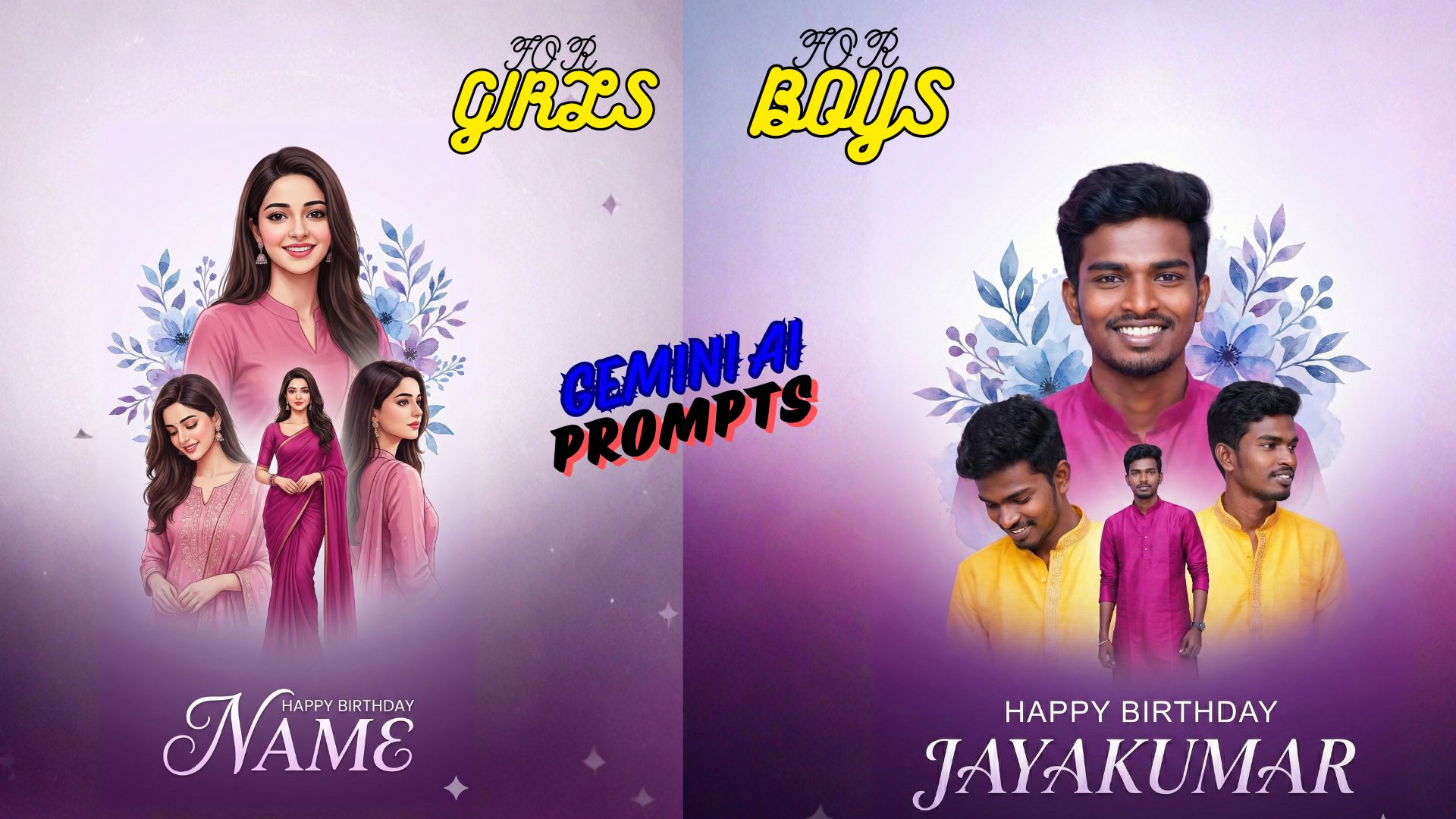
PROMPT FOR GIRLS:-


“A dreamy and elegant digitalbirthday greeting card featuring a beautiful young woman with long dark, wavy hair. The background consists of a soft, vertical gradient transitioning from a very light lavender or white at the top to a richer, darker purple at the bottom. Multiple instances of the woman are arranged in a dynamic, overlapping collage. The most prominent image is a large, smiling bust shot in the upper center, where she is wearing a solid pink or magenta top.

Below and around this main image, three other images of the woman are positioned, also wearing variations of pink or magenta traditional Indian attire (possibly a kurti and dupatta or sari). These images capture her in different poses:one looking down with a gentle smile, one standing confidently, and another looking to the side with a slight smile. The edges of these collage elements are softly blended. Interspersed within the upper part of the background, there are artistic, watercolor-style floral and leaf elements in shades of blue and purple, subtly framing the top main image. At the very bottom of the card, in smaller, clean white text, itreads ‘HAPPY BIRTHDAY’.

Below this, the name ‘NAME‘ is displayed in a very large, elegant, flowing white script font with a subtle gradient or highlight effect, giving it a sophisticated feel, The overall mood is soft, graceful, and celebration keeping the same original face (100% accurate I uploaded photo)


IMAGE :

FOR BOYES:-

“A dreamy and elegant digitalbirthday greeting card featuring a beautiful young man . The background consists of a soft, vertical gradient transitioning from a very light lavender or white at the top to a richer, darker purple at the bottom. Multiple instances of the woman are arranged in a dynamic, overlapping collage. The most prominent image is a large, smiling bust shot in the upper center, where she is wearing a solid pink or magenta top. Below and around this main image, three other images of the woman are positioned, also wearing variations of yellow or magenta traditional Indian huddy.

These images capture her in different poses:one looking down with a gentle smile, one standing confidently, and another looking to the side with a slight smile. The edges of these collage elements are softly blended. Interspersed within the upper part of the background, there are artistic, watercolor-style floral and leaf elements in shades of blue and purple, subtly framing the top main image. At the very bottom of the card, in smaller, clean white text, itreads ‘HAPPY BIRTHDAY’. Below this, the name ‘NAME‘ is displayed in a very large, elegant, flowing white script font with a subtle gradient or highlight effect, giving it a sophisticated feel, The overall mood is soft, graceful, and celebration keeping the same original face (100% accurate I uploaded photo)

VIEW ANOTHER FOR INTERESTING TO YOU